> ## Documentation Index
> Fetch the complete documentation index at: https://docs.nxtjob.ai/llms.txt
> Use this file to discover all available pages before exploring further.
# Export Profile to Resume
> Convert your LinkedIn profile into a NxtJob resume with one click, pre-filling your work history, education, and skills without manual data entry.
Optimize your LinkedIn profile first using the [Profile Optimization](/chrome-extension/profile-optimization) tool before exporting. A well-structured LinkedIn profile produces a more complete resume with fewer gaps to fill manually.
Export Profile to Resume converts your LinkedIn profile data into a NxtJob resume in a single click. Instead of retyping your work history, education, and skills, the extension pulls structured data directly from LinkedIn and populates a new resume in the Resume Builder.
This is a **Premium** feature that works best when your LinkedIn account is connected to NxtJob.
## How to Export
Navigate to your own LinkedIn profile page in Chrome.
The NxtJob sidebar opens automatically with the Profile Optimization panel. You will see the **Export Profile to Resume** button (green) at the top of the sidebar, next to the **LinkedIn Connected** indicator.
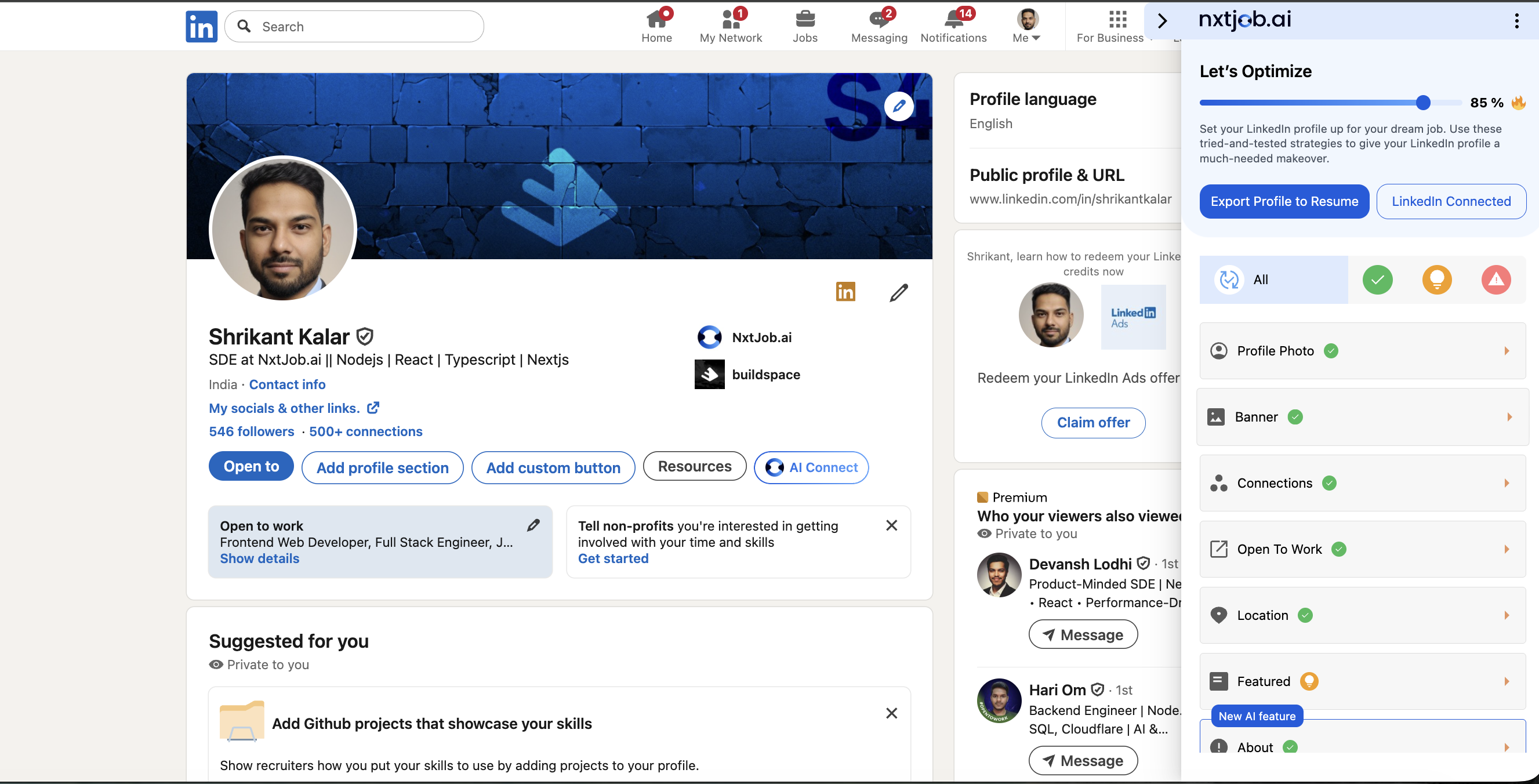 Click the button. The extension immediately begins extracting your profile data.
The extension sends your structured profile data to the Resume Builder. This takes a few seconds.
A new resume opens at resume.nxtjob.ai with your LinkedIn data pre-filled across all supported sections.
## What Gets Exported
The extension maps each LinkedIn section to the corresponding section in the Resume Builder:
| LinkedIn Section | Resume Builder Section |
| ---------------- | ----------------------------------- |
| **Name** | Personal Information (Full Name) |
| **Headline** | Professional Summary / Headline |
| **About** | Professional Summary |
| **Experience** | Work Experience |
| **Education** | Education |
| **Skills** | Skills |
| **Certificates** | Certifications |
| **Volunteering** | Volunteer Experience |
| **Location** | Personal Information (Location) |
| **LinkedIn URL** | Personal Information (LinkedIn URL) |
## After Export
Once the resume opens in the [Resume Builder](/resume-builder/builder), you can:
* Edit and refine each section using the builder interface
* Run a [Resume Score](/resume-builder/resume-score) check to identify areas for improvement
* Use AI features to enhance bullet points and summaries
* Customize the resume for specific job applications
For a full overview of everything available after export, see the [Resume Builder introduction](/resume-builder/introduction).
***
Export creates a new resume each time. If you have already exported and want to update specific sections, edit the existing resume directly in the Resume Builder rather than exporting again.
Click the button. The extension immediately begins extracting your profile data.
The extension sends your structured profile data to the Resume Builder. This takes a few seconds.
A new resume opens at resume.nxtjob.ai with your LinkedIn data pre-filled across all supported sections.
## What Gets Exported
The extension maps each LinkedIn section to the corresponding section in the Resume Builder:
| LinkedIn Section | Resume Builder Section |
| ---------------- | ----------------------------------- |
| **Name** | Personal Information (Full Name) |
| **Headline** | Professional Summary / Headline |
| **About** | Professional Summary |
| **Experience** | Work Experience |
| **Education** | Education |
| **Skills** | Skills |
| **Certificates** | Certifications |
| **Volunteering** | Volunteer Experience |
| **Location** | Personal Information (Location) |
| **LinkedIn URL** | Personal Information (LinkedIn URL) |
## After Export
Once the resume opens in the [Resume Builder](/resume-builder/builder), you can:
* Edit and refine each section using the builder interface
* Run a [Resume Score](/resume-builder/resume-score) check to identify areas for improvement
* Use AI features to enhance bullet points and summaries
* Customize the resume for specific job applications
For a full overview of everything available after export, see the [Resume Builder introduction](/resume-builder/introduction).
***
Export creates a new resume each time. If you have already exported and want to update specific sections, edit the existing resume directly in the Resume Builder rather than exporting again.