> ## Documentation Index
> Fetch the complete documentation index at: https://docs.nxtjob.ai/llms.txt
> Use this file to discover all available pages before exploring further.
# Target Companies
> Track companies you want to work at and start networking with their employees and recruiters
## What Are Target Companies?
Target Companies is a dedicated board for companies you want to work at, even if they do not have a specific job posting that matches your role yet. Instead of waiting for a listing to appear, you can proactively track companies, research their teams, and start building connections.
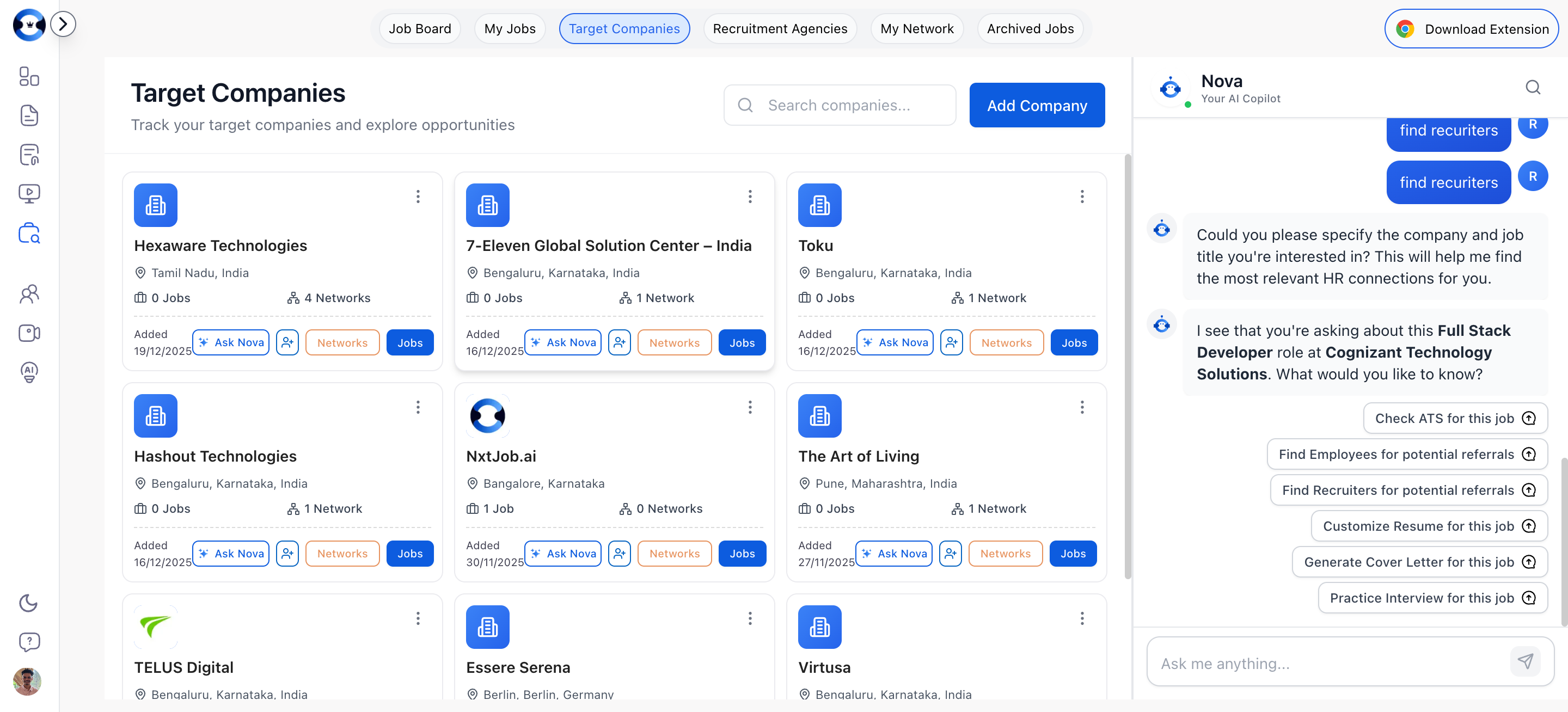
Each target company is displayed as a card with quick actions for networking, job exploration, and AI-powered insights.
 ## Adding a Target Company
### Adding Manually
Click the **"Add Company"** button at the top of the Target Companies page. A dialog opens with a form.
Complete the form:
* **Company Name** (required) — The company's official name
* **Location** (optional) — Where the company or your target office is located
* **Company Website** (optional) — The company's website URL
* **Industry** (optional) — e.g., Technology, Finance, Healthcare
* **Employee Count** (optional) — e.g., "100-500", "1000+"
* **Company Description** (optional) — A brief note about why you are targeting this company
Click **Add Company** to create the card. It appears on your Target Companies board immediately.
### Adding via Chrome Extension
When browsing a company's LinkedIn page, use the [NxtJob Chrome Extension](/chrome-extension/installation) to save the company directly to your Target Companies list. The extension pulls the company name, description, and basic information automatically. See [Networking Features](/chrome-extension/networking-features) for the full walkthrough on adding companies from LinkedIn.
## Company Card Actions
Each target company card provides quick actions:
| Action | What It Does |
| ---------------- | -------------------------------------------------------------------------------------------- |
| **Jobs** | Navigates to your My Jobs board filtered to show only jobs at this company |
| **Networks** | Navigates to your My Networks board filtered to show connections at this company |
| **Ask Nova** | Opens the AI assistant with this company's context for research and insights (Nova only) |
| **Find Network** | Opens the LinkedIn search to find employees and recruiters at this company (Nova only) |
| **Edit** | Updates company information (name, location, website, industry, employee count, description) |
| **Delete** | Removes the company from your target list (with confirmation) |
## Starting Networking for a Target Company
Click **Find Network** on any company card to open the [Find Network](/job-board/find-network) dialog pre-populated with the company name. From there, you can search for employees or recruiters and send connection requests.
People you connect with through a target company are added to your [My Networks](/job-board/my-networks) board and tagged as "Target Company" connections.
## Searching Companies
Use the search bar at the top of the page to find companies in your list by name. The search filters your cards in real time.
Add 10-15 target companies at the start of your job search, even before you see open roles. Building connections at these companies early means you will be first in line when a position opens. Proactive networking is what separates senior professionals who land roles in 60 days from those who search for six months.
## Adding a Target Company
### Adding Manually
Click the **"Add Company"** button at the top of the Target Companies page. A dialog opens with a form.
Complete the form:
* **Company Name** (required) — The company's official name
* **Location** (optional) — Where the company or your target office is located
* **Company Website** (optional) — The company's website URL
* **Industry** (optional) — e.g., Technology, Finance, Healthcare
* **Employee Count** (optional) — e.g., "100-500", "1000+"
* **Company Description** (optional) — A brief note about why you are targeting this company
Click **Add Company** to create the card. It appears on your Target Companies board immediately.
### Adding via Chrome Extension
When browsing a company's LinkedIn page, use the [NxtJob Chrome Extension](/chrome-extension/installation) to save the company directly to your Target Companies list. The extension pulls the company name, description, and basic information automatically. See [Networking Features](/chrome-extension/networking-features) for the full walkthrough on adding companies from LinkedIn.
## Company Card Actions
Each target company card provides quick actions:
| Action | What It Does |
| ---------------- | -------------------------------------------------------------------------------------------- |
| **Jobs** | Navigates to your My Jobs board filtered to show only jobs at this company |
| **Networks** | Navigates to your My Networks board filtered to show connections at this company |
| **Ask Nova** | Opens the AI assistant with this company's context for research and insights (Nova only) |
| **Find Network** | Opens the LinkedIn search to find employees and recruiters at this company (Nova only) |
| **Edit** | Updates company information (name, location, website, industry, employee count, description) |
| **Delete** | Removes the company from your target list (with confirmation) |
## Starting Networking for a Target Company
Click **Find Network** on any company card to open the [Find Network](/job-board/find-network) dialog pre-populated with the company name. From there, you can search for employees or recruiters and send connection requests.
People you connect with through a target company are added to your [My Networks](/job-board/my-networks) board and tagged as "Target Company" connections.
## Searching Companies
Use the search bar at the top of the page to find companies in your list by name. The search filters your cards in real time.
Add 10-15 target companies at the start of your job search, even before you see open roles. Building connections at these companies early means you will be first in line when a position opens. Proactive networking is what separates senior professionals who land roles in 60 days from those who search for six months.