> ## Documentation Index
> Fetch the complete documentation index at: https://docs.nxtjob.ai/llms.txt
> Use this file to discover all available pages before exploring further.
# AI Features
> Leverage AI-powered bullet generation, rewriting, summary writing, skills categorization, and resume review
NxtJob's Resume Builder includes several AI-powered tools that accelerate the resume creation and optimization process. These tools are available in two places: directly within the **builder editor** (inline AI buttons on each section) and inside the **Resume Score tab** (optimization-driven AI suggestions).
## Where to Find AI Features
AI features appear in two locations:
| Location | What You See | Best For |
| ---------------------------------- | ----------------------------------------------------------------------------------- | -------------------------------------------------------------- |
| **Builder Editor (left panel)** | **AI Generate** button on each section (Work Experience, Summary, Skills, Projects) | Creating new content from scratch or generating initial drafts |
| **Resume Score Tab (right panel)** | **Fix with AI** and **Generate** buttons next to each scoring category | Fixing specific scoring issues and optimizing existing content |
## AI in the Builder Editor
### AI Bullet Point Generation
**What it does:** Generates professional bullet points for your Work Experience and Projects entries using the **CAR Framework** (Challenge, Action, Result).
Navigate to a Work Experience or Projects entry in the builder.
Click the **AI Generate** button on the section header.
The AI produces bullet points based on your job title, company, and any existing content.
Review and edit the generated bullets to add your specific numbers, metrics, and context.
#### What the CAR Framework Produces
* **Challenge:** What problem or situation did you face?
* **Action:** What specific actions did you take?
* **Result:** What measurable outcome did you achieve?
**Example AI-generated bullet (CAR Framework):**
> Faced with **40% year-over-year growth** in API traffic (Challenge), **redesigned the caching layer** using Redis Cluster with consistent hashing (Action), resulting in **65% reduction in database load** and **\$420K annual cost savings** (Result).
### AI Summary Generation
**What it does:** Generates or rewrites your professional summary to be 30-120 words with quantified achievements.
Navigate to the Summary section in the builder.
Click the **AI Generate** button on the Summary section header.
The AI produces a summary based on your Work Experience and Skills. Edit to add your personal voice and verify the numbers.
### AI Skills Categorization
**What it does:** Analyzes your resume content and organizes skills into logical, titled buckets that match what ATS systems and recruiters expect.
Navigate to the Skills section in the builder.
Click the **AI Generate** button on the Skills section header.
The AI suggests categories and assigns your skills to appropriate buckets. Review and adjust as needed.
### AI Headline Generation
**What it does:** Generates a professional headline following the format: `[Job Title] | [Latest Company] | [Key Skills]` within the 50-100 character target.
**Example outputs:**
* "Senior Engineering Manager | Stripe | Cloud Infrastructure & Platform"
* "VP of Product | Salesforce | B2B SaaS & Growth Strategy"
* "Principal Architect | Netflix | Distributed Systems & Streaming"
## Rewrite with AI
In addition to generating new content, NxtJob's AI can **rewrite existing content** to improve clarity, impact, and scoring compliance.
### How to Rewrite a Bullet Point
Click on an existing bullet point in Work Experience or Projects to place your cursor in it.
Click the **Rewrite with AI** option that appears. This is different from AI Generate — it preserves your original meaning while improving the language.
The AI rewrites the bullet to start with a strong action verb, include quantified metrics where possible, and follow the CAR framework structure.
If the rewrite is an improvement, keep it. If not, undo the change and try again or edit manually.
### What Gets Improved During Rewrite
| Before | After |
| ------------------------------------------ | ---------------------------------------------------- |
| Bullets that don't start with action verbs | Rewritten to lead with strong action verbs |
| Vague descriptions without metrics | Enhanced with quantified impact where context allows |
| Overly long or wordy bullets | Tightened to the 50-150 character target |
| Passive voice constructions | Converted to active voice |
### Can I Rewrite Only Selected Content?
Yes. You can rewrite individual bullet points one at a time. You do not need to rewrite the entire section. This gives you precise control — keep bullets you are happy with and only rewrite the ones that need improvement.
### How Many Times Can I Rewrite?
There is no limit on the number of rewrites. You can rewrite the same bullet multiple times until you are satisfied with the result. Each rewrite considers your current content, so iterating produces progressively better output.
The best workflow is: generate a first draft with AI Generate, then selectively rewrite individual bullets that feel generic. Layer in your real numbers and context after the rewrite. This three-step process (generate, rewrite, personalize) produces the highest quality content in the least time.
## AI Features Inside the Resume Score Tab
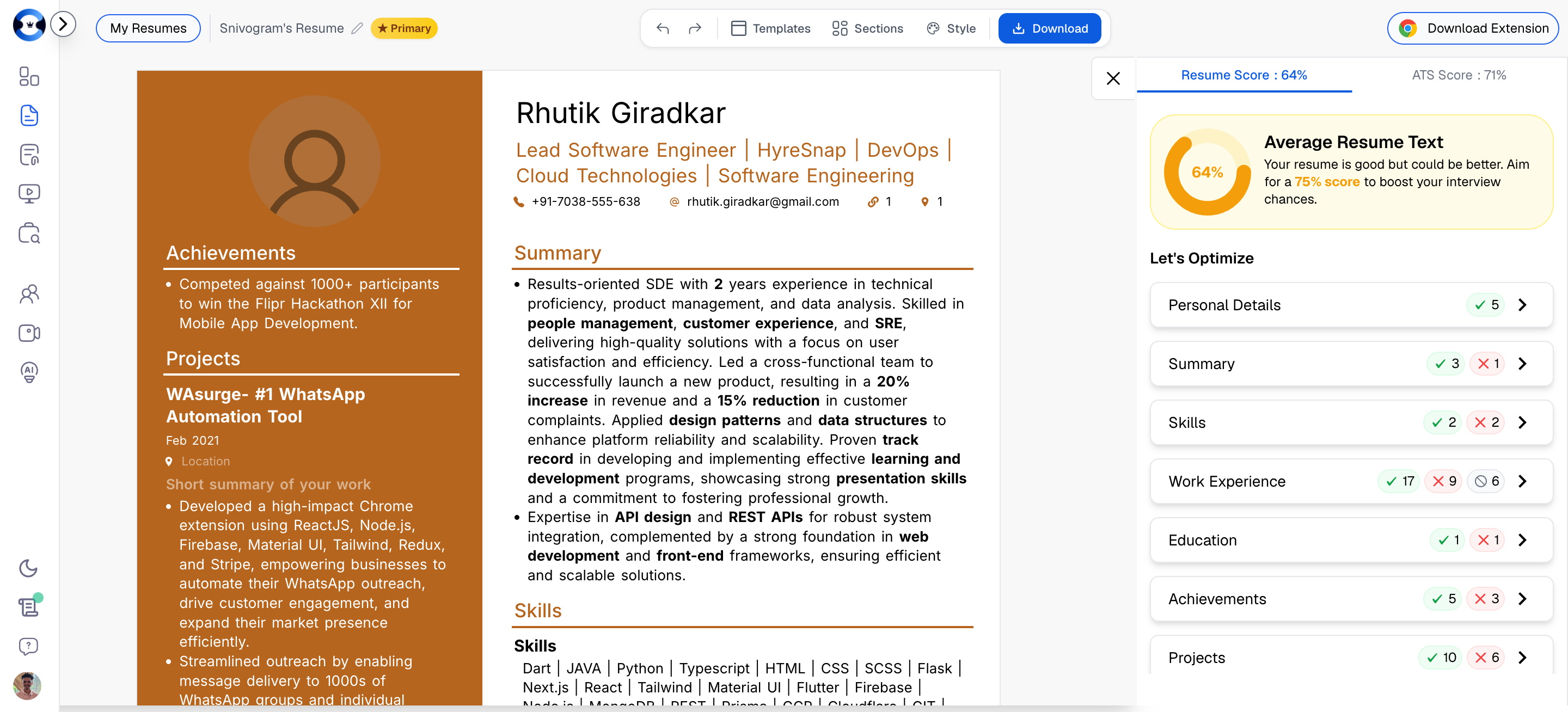
The Resume Score tab on the right panel includes AI-powered optimization buttons for each scoring category. These are different from the inline AI buttons in the editor — they are specifically designed to **fix scoring issues**.
 ### How It Works
When your Resume Score identifies issues in a specific category, you will see optimization options next to that category. These include AI-powered fixes that automatically update your resume content to address the scoring gap.
### AI for Personal Details / Title
**What it fixes:** Headline length (50-100 characters), professional formatting, and keyword inclusion.
In the Resume Score tab, click on **Personal Details** to expand the optimization options.
Click the AI option to generate or fix your professional title/headline.
The AI generates a headline in the format `[Job Title] | [Company] | [Key Skills]` that fits within the 50-100 character scoring requirement.
### AI for Summary
**What it fixes:** Summary length (30-120 words), quantification, and removal of objective-statement language.
In the Resume Score tab, click on **Summary** to expand.
Use the AI option to generate a new summary or rewrite your existing one.
The AI produces a summary that meets all scoring criteria: proper length, at least one quantified metric, no objective words, and proper bullet point structure for summaries over 70 words.
### AI for Work Experience
**What it fixes:** Bullet quantification (70%+ with numbers), action verb usage, bold highlighting, bullet length, and punctuation consistency.
In the Resume Score tab, click on **Work Experience** to expand.
The panel shows which specific rules are failing — for example, "Only 40% of bullets are quantified" or "3 bullets don't start with action verbs."
Click the AI option to have the system rewrite underperforming bullets. The AI targets the specific issues flagged by the scoring engine.
### AI for Projects
**What it fixes:** The same rules as Work Experience — quantification, action verbs, bold highlighting, bullet length, and punctuation.
Projects are evaluated using identical scoring criteria as Work Experience. The AI fix works the same way: it rewrites project bullets to meet the scoring thresholds.
### AI for Skills
**What it fixes:** Skills categorization (2+ buckets), skill count (8-20), and section positioning.
In the Resume Score tab, click on **Skills** to expand.
The AI can reorganize a flat skill list into properly categorized buckets, add missing skills based on your Work Experience content, or remove redundant entries.
## AI Grammar & Spelling Correction
**What it does:** Scans your entire resume for grammatical errors, spelling mistakes, awkward phrasing, and inconsistencies. Provides suggested corrections inline.
This feature runs across all sections simultaneously and catches issues that are easy to miss during manual editing, such as inconsistent tense (mixing past and present tense across roles), spelling variations, and punctuation inconsistencies.
## AI Resume Review
**What it does:** Provides a holistic assessment of your resume organized into three sections:
1. **Strengths** — What your resume does well. Specific sections and elements that are effective.
2. **Improvements** — Targeted suggestions for enhancing existing content. Actionable recommendations with specific examples.
3. **Weaknesses** — Areas that need significant attention. Critical gaps that may hurt your candidacy.
Look for the AI Review option in the score panel. The review considers your entire resume in context, not just individual rules. It evaluates narrative coherence, career progression clarity, and overall positioning.
## Section-by-Section AI Quick Reference
| Section | AI Generate | Rewrite with AI | Fix from Score Tab |
| -------------------- | --------------------- | -------------------------- | ---------------------------------------- |
| **Personal Details** | Headline generation | — | Title length and format |
| **Summary** | Full summary draft | Rewrite existing summary | Length, quantification, structure |
| **Skills** | Auto-categorization | — | Bucket organization, count |
| **Work Experience** | CAR framework bullets | Rewrite individual bullets | Quantification, action verbs, formatting |
| **Projects** | CAR framework bullets | Rewrite individual bullets | Same rules as Work Experience |
| **Education** | — | — | Completeness checks |
| **Certifications** | — | — | Completeness checks |
| **Languages** | — | — | Completeness checks |
Use AI features as a starting point, not a final product. AI-generated content is most effective when you layer in your specific achievements, your actual numbers, and your authentic professional voice. The AI gives you structure and language; you provide the substance.
### How It Works
When your Resume Score identifies issues in a specific category, you will see optimization options next to that category. These include AI-powered fixes that automatically update your resume content to address the scoring gap.
### AI for Personal Details / Title
**What it fixes:** Headline length (50-100 characters), professional formatting, and keyword inclusion.
In the Resume Score tab, click on **Personal Details** to expand the optimization options.
Click the AI option to generate or fix your professional title/headline.
The AI generates a headline in the format `[Job Title] | [Company] | [Key Skills]` that fits within the 50-100 character scoring requirement.
### AI for Summary
**What it fixes:** Summary length (30-120 words), quantification, and removal of objective-statement language.
In the Resume Score tab, click on **Summary** to expand.
Use the AI option to generate a new summary or rewrite your existing one.
The AI produces a summary that meets all scoring criteria: proper length, at least one quantified metric, no objective words, and proper bullet point structure for summaries over 70 words.
### AI for Work Experience
**What it fixes:** Bullet quantification (70%+ with numbers), action verb usage, bold highlighting, bullet length, and punctuation consistency.
In the Resume Score tab, click on **Work Experience** to expand.
The panel shows which specific rules are failing — for example, "Only 40% of bullets are quantified" or "3 bullets don't start with action verbs."
Click the AI option to have the system rewrite underperforming bullets. The AI targets the specific issues flagged by the scoring engine.
### AI for Projects
**What it fixes:** The same rules as Work Experience — quantification, action verbs, bold highlighting, bullet length, and punctuation.
Projects are evaluated using identical scoring criteria as Work Experience. The AI fix works the same way: it rewrites project bullets to meet the scoring thresholds.
### AI for Skills
**What it fixes:** Skills categorization (2+ buckets), skill count (8-20), and section positioning.
In the Resume Score tab, click on **Skills** to expand.
The AI can reorganize a flat skill list into properly categorized buckets, add missing skills based on your Work Experience content, or remove redundant entries.
## AI Grammar & Spelling Correction
**What it does:** Scans your entire resume for grammatical errors, spelling mistakes, awkward phrasing, and inconsistencies. Provides suggested corrections inline.
This feature runs across all sections simultaneously and catches issues that are easy to miss during manual editing, such as inconsistent tense (mixing past and present tense across roles), spelling variations, and punctuation inconsistencies.
## AI Resume Review
**What it does:** Provides a holistic assessment of your resume organized into three sections:
1. **Strengths** — What your resume does well. Specific sections and elements that are effective.
2. **Improvements** — Targeted suggestions for enhancing existing content. Actionable recommendations with specific examples.
3. **Weaknesses** — Areas that need significant attention. Critical gaps that may hurt your candidacy.
Look for the AI Review option in the score panel. The review considers your entire resume in context, not just individual rules. It evaluates narrative coherence, career progression clarity, and overall positioning.
## Section-by-Section AI Quick Reference
| Section | AI Generate | Rewrite with AI | Fix from Score Tab |
| -------------------- | --------------------- | -------------------------- | ---------------------------------------- |
| **Personal Details** | Headline generation | — | Title length and format |
| **Summary** | Full summary draft | Rewrite existing summary | Length, quantification, structure |
| **Skills** | Auto-categorization | — | Bucket organization, count |
| **Work Experience** | CAR framework bullets | Rewrite individual bullets | Quantification, action verbs, formatting |
| **Projects** | CAR framework bullets | Rewrite individual bullets | Same rules as Work Experience |
| **Education** | — | — | Completeness checks |
| **Certifications** | — | — | Completeness checks |
| **Languages** | — | — | Completeness checks |
Use AI features as a starting point, not a final product. AI-generated content is most effective when you layer in your specific achievements, your actual numbers, and your authentic professional voice. The AI gives you structure and language; you provide the substance.