

Where to Find AI Features
AI features appear in two locations:AI in the Builder Editor
AI Bullet Point Generation
What it does: Generates professional bullet points for your Work Experience and Projects entries using the CAR Framework (Challenge, Action, Result).1
Navigate to the section
Navigate to a Work Experience or Projects entry in the builder.
2
Click AI Generate
Click the AI Generate button on the section header.
3
Review the output
The AI produces bullet points based on your job title, company, and any existing content.
4
Edit and personalize
Review and edit the generated bullets to add your specific numbers, metrics, and context.
What the CAR Framework Produces
- Challenge: What problem or situation did you face?
- Action: What specific actions did you take?
- Result: What measurable outcome did you achieve?
Faced with 40% year-over-year growth in API traffic (Challenge), redesigned the caching layer using Redis Cluster with consistent hashing (Action), resulting in 65% reduction in database load and $420K annual cost savings (Result).
AI Summary Generation
What it does: Generates or rewrites your professional summary to be 30-120 words with quantified achievements.1
Navigate to Summary
Navigate to the Summary section in the builder.
2
Click AI Generate
Click the AI Generate button on the Summary section header.
3
Review and refine
The AI produces a summary based on your Work Experience and Skills. Edit to add your personal voice and verify the numbers.
AI Skills Categorization
What it does: Analyzes your resume content and organizes skills into logical, titled buckets that match what ATS systems and recruiters expect.1
Navigate to Skills
Navigate to the Skills section in the builder.
2
Click AI Generate
Click the AI Generate button on the Skills section header.
3
Review categories
The AI suggests categories and assigns your skills to appropriate buckets. Review and adjust as needed.
AI Headline Generation
What it does: Generates a professional headline following the format:[Job Title] | [Latest Company] | [Key Skills] within the 50-100 character target.
Example outputs:
- “Senior Engineering Manager | Stripe | Cloud Infrastructure & Platform”
- “VP of Product | Salesforce | B2B SaaS & Growth Strategy”
- “Principal Architect | Netflix | Distributed Systems & Streaming”
Rewrite with AI
In addition to generating new content, NxtJob’s AI can rewrite existing content to improve clarity, impact, and scoring compliance.How to Rewrite a Bullet Point
1
Select the content
Click on an existing bullet point in Work Experience or Projects to place your cursor in it.
2
Click Rewrite with AI
Click the Rewrite with AI option that appears. This is different from AI Generate — it preserves your original meaning while improving the language.
3
Review the rewritten version
The AI rewrites the bullet to start with a strong action verb, include quantified metrics where possible, and follow the CAR framework structure.
4
Accept or discard
If the rewrite is an improvement, keep it. If not, undo the change and try again or edit manually.
What Gets Improved During Rewrite
Can I Rewrite Only Selected Content?
Yes. You can rewrite individual bullet points one at a time. You do not need to rewrite the entire section. This gives you precise control — keep bullets you are happy with and only rewrite the ones that need improvement.How Many Times Can I Rewrite?
There is no limit on the number of rewrites. You can rewrite the same bullet multiple times until you are satisfied with the result. Each rewrite considers your current content, so iterating produces progressively better output.AI Features Inside the Resume Score Tab
The Resume Score tab on the right panel includes AI-powered optimization buttons for each scoring category. These are different from the inline AI buttons in the editor — they are specifically designed to fix scoring issues.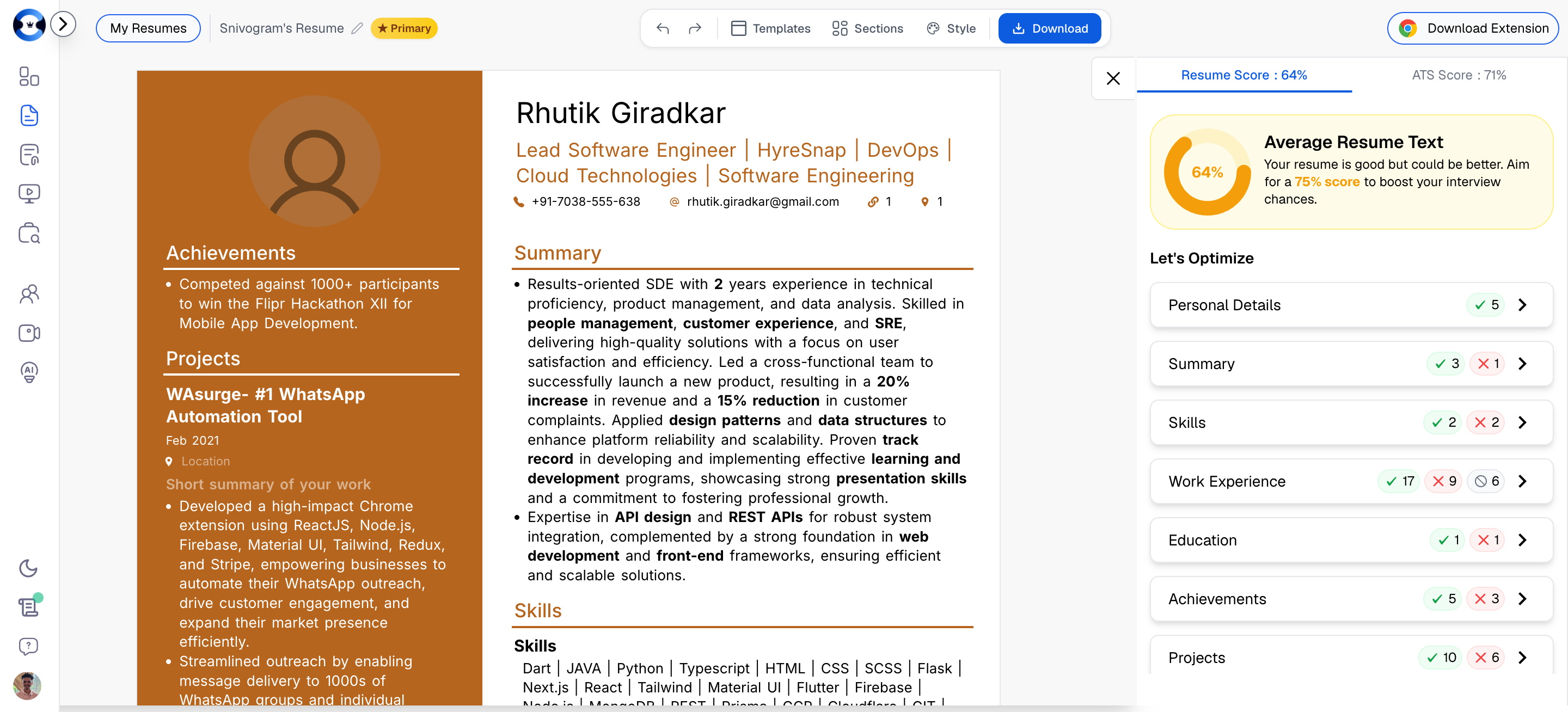
How It Works
When your Resume Score identifies issues in a specific category, you will see optimization options next to that category. These include AI-powered fixes that automatically update your resume content to address the scoring gap.AI for Personal Details / Title
What it fixes: Headline length (50-100 characters), professional formatting, and keyword inclusion.1
Open the Personal Details category
In the Resume Score tab, click on Personal Details to expand the optimization options.
2
Click Generate or Fix
Click the AI option to generate or fix your professional title/headline.
3
Review the suggestion
The AI generates a headline in the format
[Job Title] | [Company] | [Key Skills] that fits within the 50-100 character scoring requirement.AI for Summary
What it fixes: Summary length (30-120 words), quantification, and removal of objective-statement language.1
Open the Summary category
In the Resume Score tab, click on Summary to expand.
2
Click Generate or Rewrite
Use the AI option to generate a new summary or rewrite your existing one.
3
Review and edit
The AI produces a summary that meets all scoring criteria: proper length, at least one quantified metric, no objective words, and proper bullet point structure for summaries over 70 words.
AI for Work Experience
What it fixes: Bullet quantification (70%+ with numbers), action verb usage, bold highlighting, bullet length, and punctuation consistency.1
Open the Work Experience category
In the Resume Score tab, click on Work Experience to expand.
2
Review flagged issues
The panel shows which specific rules are failing — for example, “Only 40% of bullets are quantified” or “3 bullets don’t start with action verbs.”
3
Use AI to fix
Click the AI option to have the system rewrite underperforming bullets. The AI targets the specific issues flagged by the scoring engine.
AI for Projects
What it fixes: The same rules as Work Experience — quantification, action verbs, bold highlighting, bullet length, and punctuation. Projects are evaluated using identical scoring criteria as Work Experience. The AI fix works the same way: it rewrites project bullets to meet the scoring thresholds.AI for Skills
What it fixes: Skills categorization (2+ buckets), skill count (8-20), and section positioning.1
Open the Skills category
In the Resume Score tab, click on Skills to expand.
2
Use AI to reorganize
The AI can reorganize a flat skill list into properly categorized buckets, add missing skills based on your Work Experience content, or remove redundant entries.
AI Grammar & Spelling Correction
What it does: Scans your entire resume for grammatical errors, spelling mistakes, awkward phrasing, and inconsistencies. Provides suggested corrections inline. This feature runs across all sections simultaneously and catches issues that are easy to miss during manual editing, such as inconsistent tense (mixing past and present tense across roles), spelling variations, and punctuation inconsistencies.AI Resume Review
What it does: Provides a holistic assessment of your resume organized into three sections:- Strengths — What your resume does well. Specific sections and elements that are effective.
- Improvements — Targeted suggestions for enhancing existing content. Actionable recommendations with specific examples.
- Weaknesses — Areas that need significant attention. Critical gaps that may hurt your candidacy.