

How the Score Is Calculated
The Resume Score uses a straightforward formula:Score Thresholds
Your target: 75%+ for every resume you submit. For highly competitive senior roles, aim for 85%+.
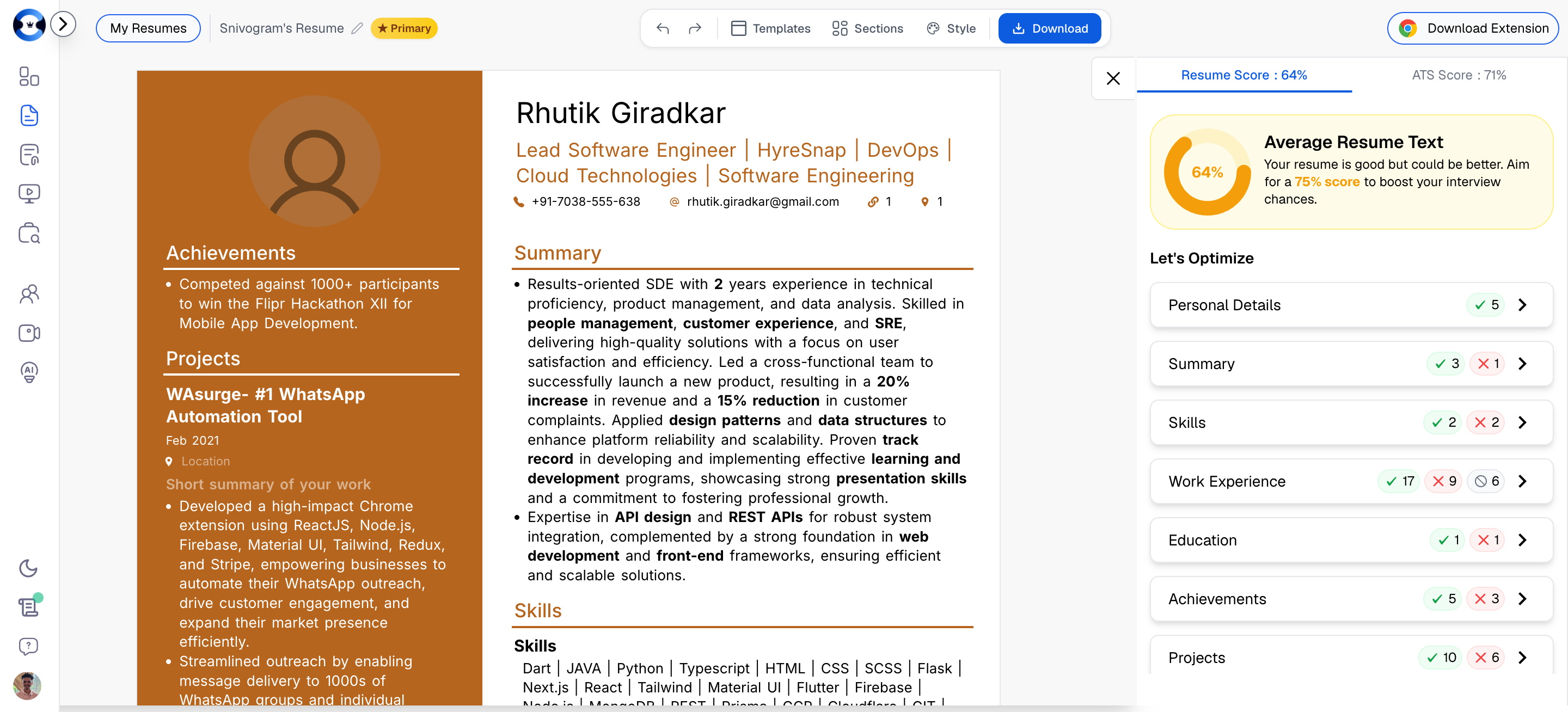
The Optimization Panel
The right panel of the Resume Builder contains a “Let’s Optimize” section that breaks down your score by category. Each category displays colored indicators (green, yellow, red) and a count of checks passed vs. total checks. Click into any category to see specific, actionable recommendations. Each recommendation tells you exactly what to fix and why.A. Overall Resume
These rules evaluate your resume as a whole document, independent of any specific section.Resume Length (450-850 Words)
What it checks: Your total word count should fall between 450 and 850 words. Why it matters: Too short and you appear inexperienced. Too long and recruiters lose interest, and ATS systems may truncate content. The 450-850 range is the sweet spot for senior professionals. How to fix:- If too short: Add more bullet points to Work Experience, expand your Summary, or add a Projects section.
- If too long: Trim older roles to 0-3 bullets, remove redundant skills, and tighten verbose bullet points.
Reverse Chronological Order
What it checks: Your Work Experience entries are ordered from most recent to oldest. Why it matters: This is one of the highest-impact rules. Virtually every recruiter and ATS system expects reverse chronological order. Your most recent and relevant role should be the first thing they see. How to fix: Use the Move Up / Move Down buttons in the builder to reorder entries. Most recent role goes first.Critical Sections Present
What it checks: Your resume includes all five essential sections:- Personal Details
- Summary
- Skills
- Work Experience
- Education
Number of Sections (5-8)
What it checks: Your resume has between 5 and 8 sections total. Why it matters: Fewer than 5 sections suggests incomplete content. More than 8 creates clutter and dilutes focus. How to fix: A strong section lineup is: Personal Details, Summary, Skills, Work Experience, Projects (optional), Education, Certifications (if relevant), Achievements (if notable). That gives you 6-8 sections.Shorten URLs
What it checks: Any URLs in your resume are under 30 characters. Why it matters: Long URLs waste valuable resume space and can break across lines in ways that confuse ATS parsers. How to fix: Use URL shorteners or LinkedIn’s custom URL feature. For example, change a long LinkedIn URL tolinkedin.com/in/yourname.
Buzz Words (Max 2 Instances)
What it checks: Your resume contains no more than 2 instances of recognized buzz words. The system checks for 88+ buzz words including: Very, Highly, Proactive, Synergy, Team player, Self-starter, Detail-oriented, Dynamic, Seasoned, Expert, Rockstar, Passionate, and many more. Why it matters: These words are vague, overused, and tell the reader nothing specific. Recruiters want evidence, not adjectives. How to fix: Replace every buzz word with a specific, quantified achievement:Revision Date (Update Every 6 Months)
What it checks: Your resume has been updated within the last 6 months. Why it matters: An outdated resume may contain stale information, miss recent achievements, and lack current industry keywords.Soft Skills Coverage (7 Categories)
What it checks: Your resume demonstrates soft skills across 7 categories, with at least 2 keyword matches in each category. This is one of the most comprehensive rules and has a significant impact on your score. Here are all 7 categories with their recognized keywords: 1. LeadershipDirected, Guided, Championed, Led, Inspired, Spearheaded, Mentored, Supervised, Orchestrated, Oversaw, Delegated, Empowered, Mobilized, Steered, Captained2. Communication
Collaborated, Negotiated, Presented, Advocated, Communicated, Articulated, Briefed, Corresponded, Conveyed, Persuaded, Mediated, Facilitated, Authored, Published3. Teamwork
Coordinated, Unified, Harmonized, Partnered, Cooperated, Integrated, Supported, Contributed, Assisted, Engaged, Fostered, Cultivated4. Analytical & Problem Solving
Analyzed, Diagnosed, Strategized, Optimized, Researched, Investigated, Evaluated, Assessed, Resolved, Deciphered, Interpreted, Identified, Examined, Dissected5. Initiative & Drive
Spearheaded, Pioneered, Innovated, Initiated, Launched, Founded, Established, Introduced, Proposed, Designed, Created, Developed, Originated, Devised6. Adaptability
Adapted, Pivoted, Navigated, Transitioned, Embraced, Transformed, Evolved, Adjusted, Recalibrated, Restructured, Modernized, Revamped, Overhauled7. Time & Project Management
Coordinated, Prioritized, Managed, Scheduled, Organized, Streamlined, Implemented, Executed, Delivered, Planned, Tracked, Allocated, Budgeted, MonitoredHow to fix: Review your Work Experience bullet points and ensure you are using action verbs from all 7 categories. Across your entire resume, each category should have at least 2 matching keywords.
B. Personal Details
These rules evaluate the contact and identity section at the top of your resume.Title/Headline Length (50-100 Characters)
What it checks: Your professional headline is between 50 and 100 characters. Good examples:- “Senior Engineering Manager | Stripe | Cloud Infrastructure & Platform” (70 chars)
- “VP of Product | B2B SaaS | Growth Strategy & Go-to-Market” (57 chars)
- “Software Engineer” (17 chars — too short, too generic)
- A 162-character headline with every keyword you can think of (far too long)
Professional Email
What it checks: Two things:- Your email does not contain a birth year (e.g., john.smith1985@gmail.com).
- Your email does not contain buzz words (ninja, wizard, guru, rockstar, etc.).
Location Format
What it checks: Your location field is under 40 characters and follows a City + State/Country format. Good: “San Francisco, CA” / “London, United Kingdom” Bad: “123 Main Street, Apartment 4B, San Francisco, California, 94102”Critical Fields Present
What it checks: All five critical contact fields are filled: Name, Email, Phone, Location, and LinkedIn URL.Completeness
What it checks: Every available field in the Personal Details section is filled, including optional fields like portfolio URL, GitHub, or personal website.C. Summary
These rules evaluate the professional summary paragraph at the top of your resume.Length (30-120 Words)
What it checks: Your summary is between 30 and 120 words. For senior professionals, aim for 60-100 words.Quantification (At Least 1 Number/Metric)
What it checks: Your summary contains at least one numerical value or metric. Before (no numbers):“Experienced engineering leader with extensive background in building scalable platforms and managing large teams.”After (quantified):
“Engineering leader with 14 years of experience building scalable platforms serving 50M+ users. Managed teams of up to 45 engineers across 3 organizations, delivering $12M+ in annual revenue impact.”
No Objective Words
What it checks: Your summary does not contain objective-statement language: “Objective”, “Seeking”, “To obtain”, “Looking for.” Why it matters: Objective statements are outdated. Modern resumes lead with value, not requests.Bullet Points
What it checks:- If your summary is under 70 words: no bullet points needed (paragraph format is fine).
- If your summary is 70+ words: it should use 2-4 bullet points for readability.
D. Skills
Categorization (2+ Titled Skill Buckets)
What it checks: Your skills are organized into at least 2 named categories (buckets). Bad: A flat list — Python, Java, AWS, Kubernetes, Leadership, Agile, PostgreSQL Good: Organized categories —Languages & Frameworks: Python, Java, React, Node.js Cloud & Infrastructure: AWS, Kubernetes, Terraform, Docker Leadership & Process: Team Management (45+ engineers), Agile/Scrum, OKR Planning
Skill Count (8-20 Skills)
What it checks: You have between 8 and 20 individual skills listed. Fewer than 8 suggests a narrow skill set. More than 20 dilutes focus.Section Position (Should Be 3rd)
What it checks: The Skills section is the 3rd section in your resume, after Personal Details and Summary.E. Work Experience (Per Role)
This is typically the largest scoring category and the one where most points are won or lost. Every rule below is evaluated per role.Quantify Impact (70%+ of Bullets Must Have Numbers)
What it checks: At least 70% of your bullet points in each role contain a number, percentage, dollar figure, or other quantifiable metric. Before (no numbers):After (quantified):
- Led the migration of the company’s infrastructure to the cloud
- Managed a large engineering team across multiple offices
- Improved system performance and reduced downtime
Types of numbers to include: Dollar amounts, percentages, headcount, scale metrics, time metrics, and counts.
- Led migration of 200+ microservices to AWS, reducing infrastructure costs by 34% ($1.8M annually)
- Managed 45-person engineering team across 3 offices (SF, NYC, London), maintaining 92% retention rate
- Improved system P99 latency from 850ms to 120ms and reduced unplanned downtime by 78%
Bullet Point Count (Varies by Recency)
Action Verbs (Every Bullet Must Start with One)
What it checks: Every bullet point begins with a recognized action verb. The system recognizes 500+ action verbs.Bold Highlighting (70%+ of Bullets Should Have Bold)
What it checks: At least 70% of your bullet points contain bold-formatted text highlighting key information.No Over-highlighting (Less Than 60% Bold)
What it checks: Less than 60% of the text within any bullet point is bold. If everything is bold, nothing is bold. Bad (over-highlighted):Good (selective highlighting):
- Led migration of 200+ microservices to AWS, reducing infrastructure costs by 34% ($1.8M annually) and improving deployment frequency from monthly to daily
- Led migration of 200+ microservices to AWS, reducing infrastructure costs by 34% ($1.8M annually) and improving deployment frequency from monthly to daily
Bullet Length (50-150 Characters Each)
Under 50 characters usually means the bullet is too vague. Over 150 characters means it should be split or tightened.Consistent Punctuation (Period at End)
All bullet points should end with a period. Consistency signals attention to detail.Completeness (All Fields Filled)
Every field in each Work Experience entry should be populated: job title, company name, start date, end date (or “Present”), location.F. Education
Section Position
For professionals with significant work experience, the Education section should be positioned at or near the end of the resume.Completeness
All fields should be filled: degree type, field of study, institution name, dates, and location.G. Projects
Projects are evaluated using the same rules as Work Experience: quantification, bullet count, action verbs, bold highlighting, no over-highlighting, bullet length, punctuation, and completeness.H. Achievements
Achievements are also evaluated using the same rules as Work Experience. Example achievements for senior professionals:
- Awarded CTO Innovation Prize for designing real-time fraud detection system that prevented $12M in losses.
- Published 3 papers on distributed consensus algorithms in IEEE; cited 140+ times.
- Speaker at AWS re:Invent 2025, presenting to 2,000+ attendees on serverless architecture patterns.